U.S. plans → Canadian-ready sets

Feet and inches in.
Millimetres out. Automagically.

Drop in a house plan PDF, pick your options, check out, and download a converted set a few minutes later. Every dimension, call-out and note changes right on your sheets.

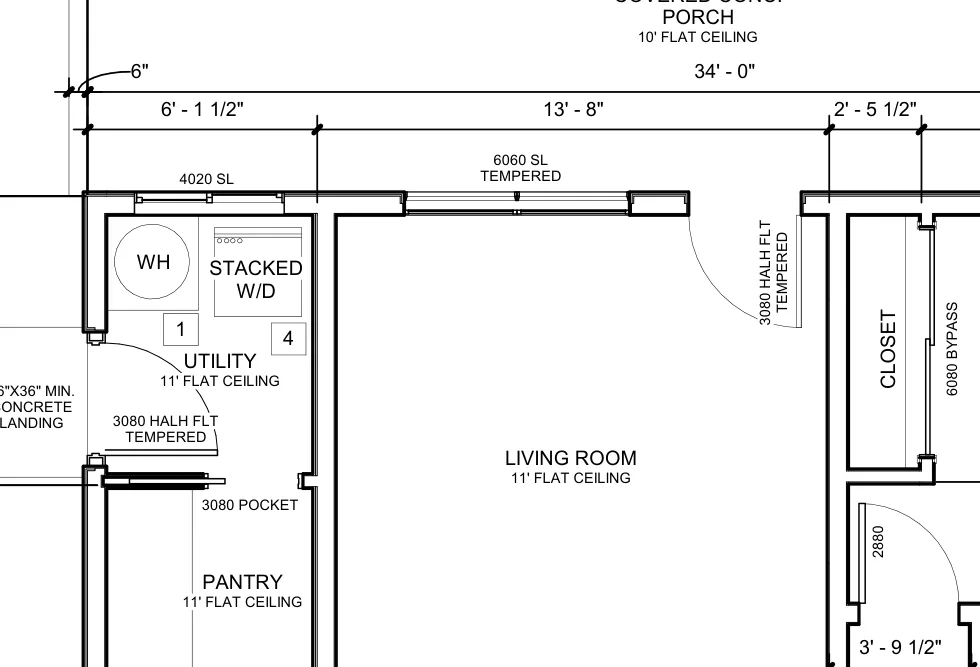
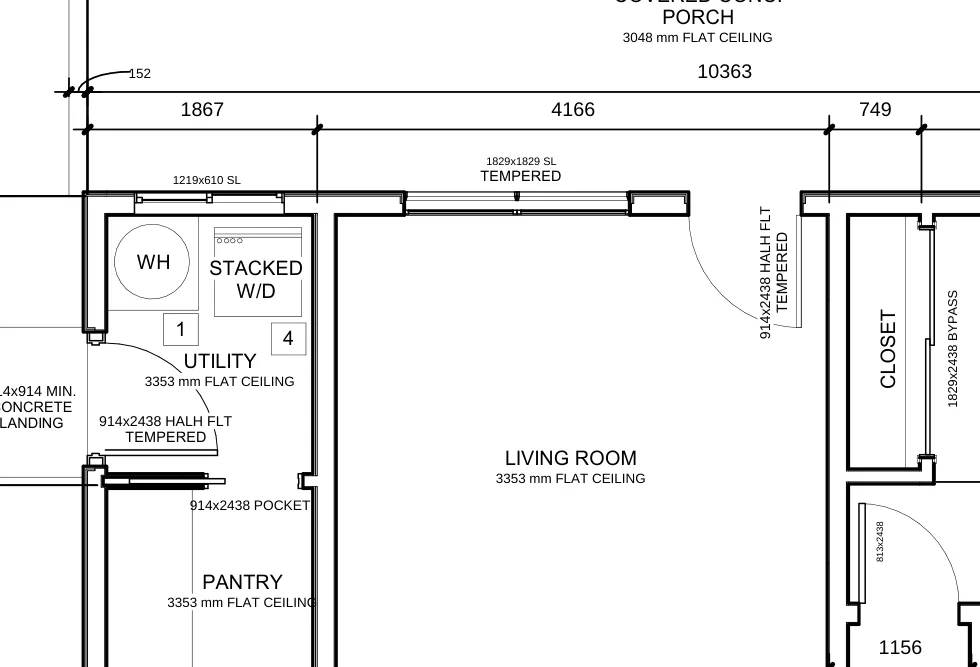
12'-10" → 3912 3068 → 914x2032 2x6 @ 16" O.C. → 38x140 @ 400 952 SQ FT → 88.4 m²
Original U.S. floor plan with feet and inches The same floor plan converted to millimetres ORIGINALMETRIC

A real sheet from a Value Home Plans set. Drag to compare.

Pick your converter

Three tools. One upload.

Every converter keeps your title block, sheet layout and linework exactly where they were. Only the text changes.

01 · METRIC

Metric Plan Conversion

$199 per plan set
  • Dimensions, heights and elevations to mm
  • Window and door call-outs to metric W x H
  • Lumber, O.C. spacing, rebar, scales and areas
  • PSI, GPM, CFM, R-values and more
  • A change log listing every single edit

Add French or Spanish text for $49.

Start metric conversion
Canada-ready 02 · METRIC + NBC

Metric + Canadian Code Notes

$248 $199 + $49 NBC notes
  • Everything in Metric Plan Conversion
  • A new Canadian code notes sheet, in your set's own title block
  • National Building Code of Canada 2020, Part 9 general notes
  • Conversion reference and a metric window and door schedule built from your plan

Add French or Spanish text for $49.

Start metric + NBC notes
03 · LANGUAGE

Plan Translation

$49 French or Spanish
  • Room names, notes, call-outs and title block text
  • Construction wording builders actually use
  • Numbers and dimensions left exactly as drawn
  • Works on its own, no metric conversion needed

Français · Español

Start a translation
How it works

Four steps, about as many minutes.

Upload your PDF

Any vector plan set up to 150 MB and 80 sheets. Your file goes straight to us, nowhere else.

Choose your options

Metric, Canadian code notes, and French or Spanish. The price updates as you go.

Check out with Square

Pay by card, Apple Pay or Google Pay on Square's secure checkout.

Download, automagically

Your converted set and change log appear on your order page as soon as they're ready.

Canadian code notes sheet

A notes sheet that looks like it was always in the set.

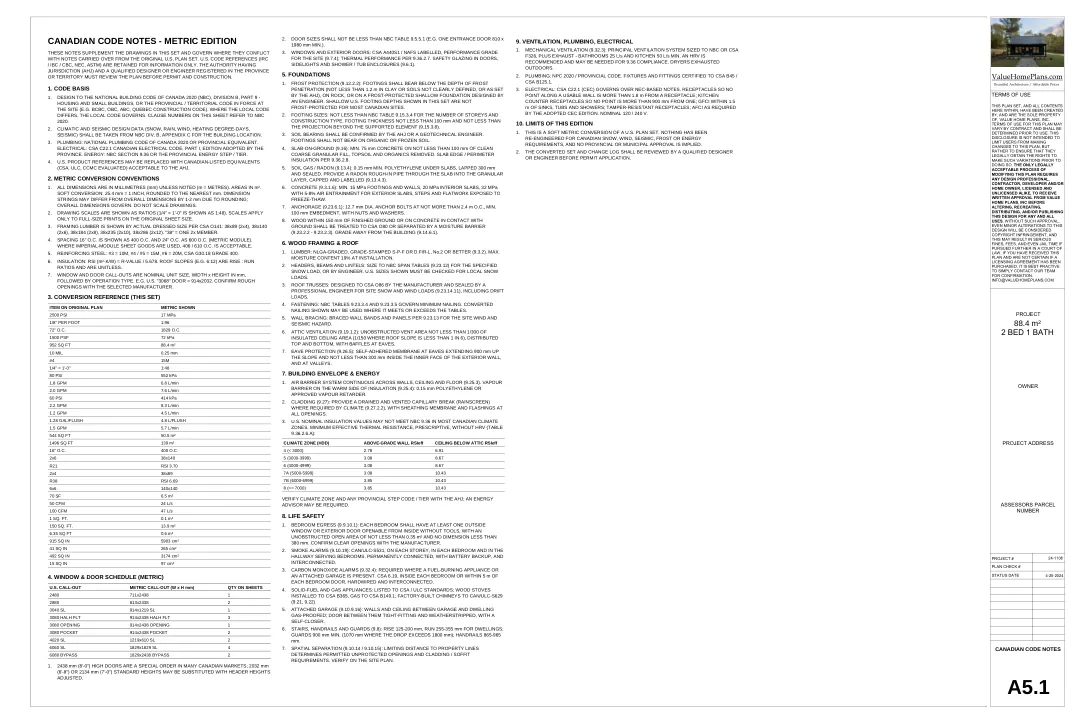
The NBC option adds a sheet like A5.1 to the end of your set, using your own title block, numbering and branding. The notes are written for your plan, so a slab house gets slab notes and a set with a wood stove gets carbon monoxide alarms.

  • 01Code basis and metric conventions
  • 02Conversion reference and a metric window and door schedule from your sheets
  • 03Foundations, framing, envelope and energy (9.36), life safety, ventilation
  • 04Overflow sheets numbered for you when the notes run long
Example Canadian code notes sheet in the plan's own title block
Questions

Good to know

What do I get back?

A converted PDF of your full set (plus the notes sheet if you chose it), and a change log spreadsheet listing every original value next to its new one. Anything worth a second look is marked so you can find it fast.

Is this an engineered or code-approved set?

No. It's a soft conversion: values are converted, not redesigned. Nothing is re-engineered for Canadian snow, wind, seismic, frost or energy loads. A qualified designer or engineer and your local building authority should review the set before permit.

Which PDFs work best?

Plans exported from CAD (Revit, Chief Architect, AutoCAD, SketchUp Layout and similar) with selectable text. Scanned sets work too, but only the parts we can read clearly are changed, and the rest is listed for review.

How good is the French or Spanish?

It's written in everyday construction language, and numbers are never changed. It's a quick, practical first pass for builders and clients. For permit or contract documents, have a fluent reviewer read it over.

How long does it take?

Most sets are ready within a few minutes of payment. Big sets with translation can take a little longer. Keep the order page open, or bookmark it and come back.

Can I use this on any plan?

Only on plans you own or are licensed to modify. You'll confirm that at checkout.